 Enlarge screenshot
Answers and keeps the context
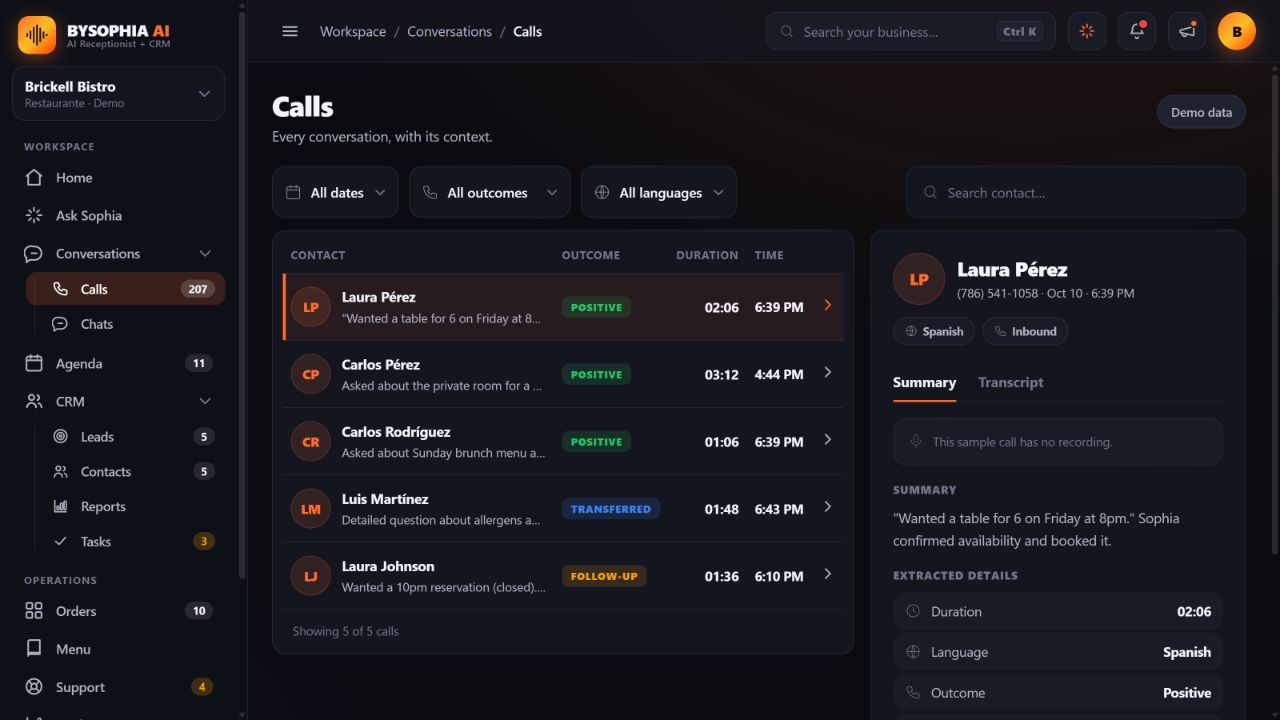
Sophia answers 24/7 in English and Spanish. Review who called, what they needed, the transcript and the outcome.
bySophia AI answers every call, qualifies every lead, and books every appointment, automatically. Day or night. In English and Spanish. And every call lands in your built-in CRM.
Music: original score for bySophia AI. Piano samples: Salamander Grand Piano by Alexander Holm, CC BY 3.0, pitched, sequenced and mixed.
No add-on modules: it all lives in your dashboard from day one.
Instead of paid testimonials, we'd rather you experience bySophia firsthand, pretend to be a customer in your own industry and judge for yourself. The number below is our live agent, no scripts, no setup.
All calls answered by AI. Calls may be recorded, Florida §934.03 two-party consent applies.
When no one answers, a customer can call another business. See how bySophia helps.


A customer may hang up before leaving a message.
Inquiries arrive after hours, on weekends and on holidays.
Covering every shift adds staffing costs.
Your team repeats the same answers about hours, services and availability.
bySophia AI is an intelligent AI Receptionist, built and configured by EA Creative LLC specifically for your business. She speaks naturally, understands your customers, and handles every conversation, from the first greeting to booking the appointment, without you having to do a thing.
A receptionist and the tools to keep your business moving, in one place.
Enlarge screenshot
Sophia answers 24/7 in English and Spanish. Review who called, what they needed, the transcript and the outcome.
 Enlarge screenshot
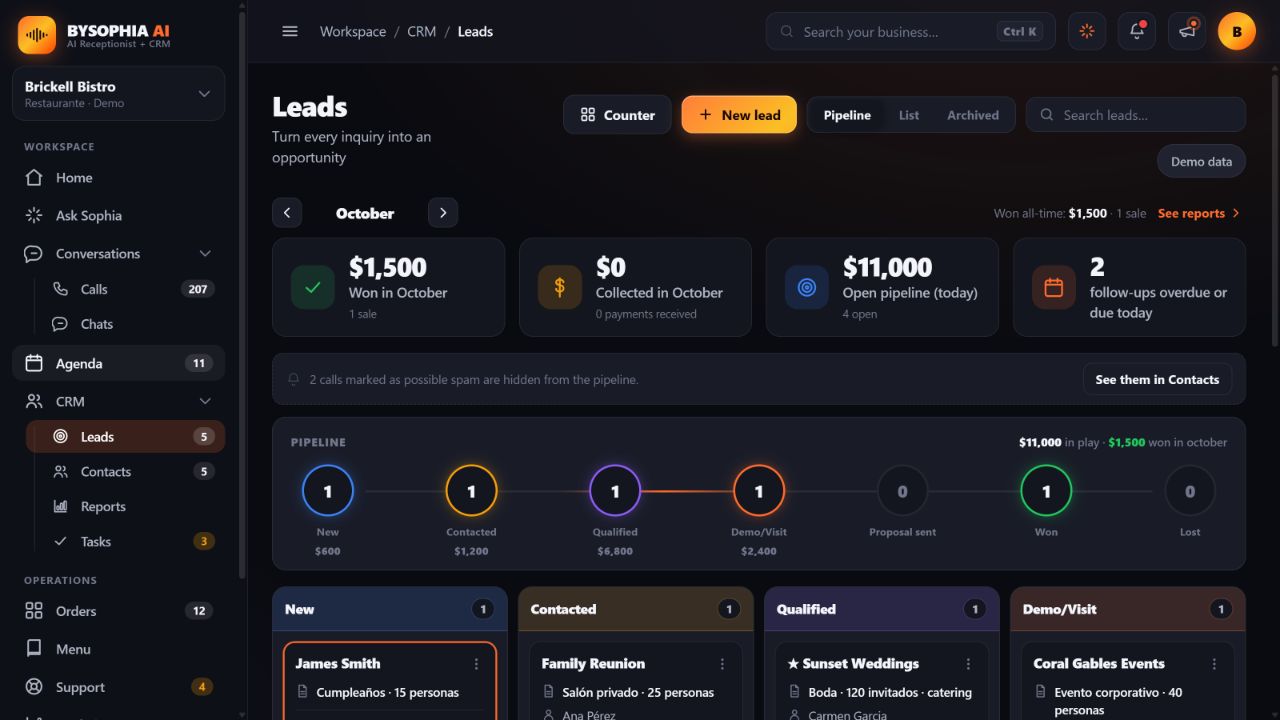
Capture contact details and needs, then follow each opportunity through a visual pipeline with value, tasks and next steps.
 Enlarge screenshot
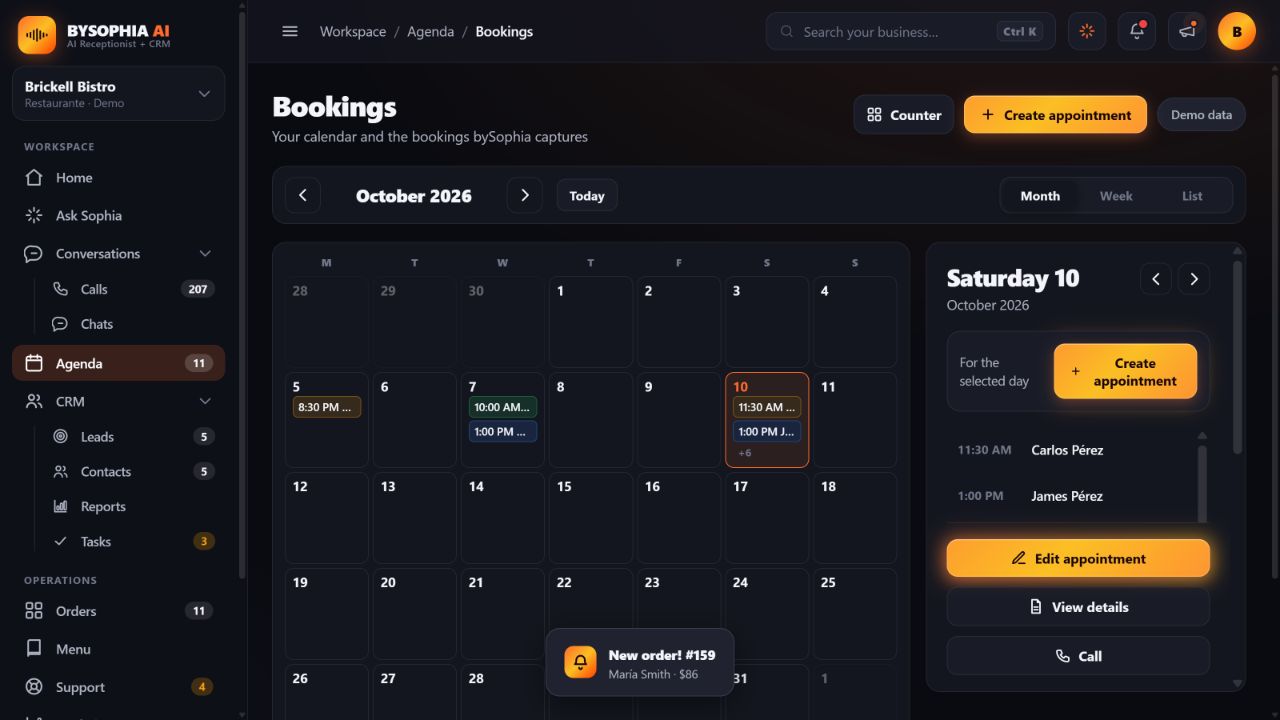
Book during the call with connected Google Calendar. Review your month, create appointments in bySophia and assign them to your team.
 Enlarge screenshot
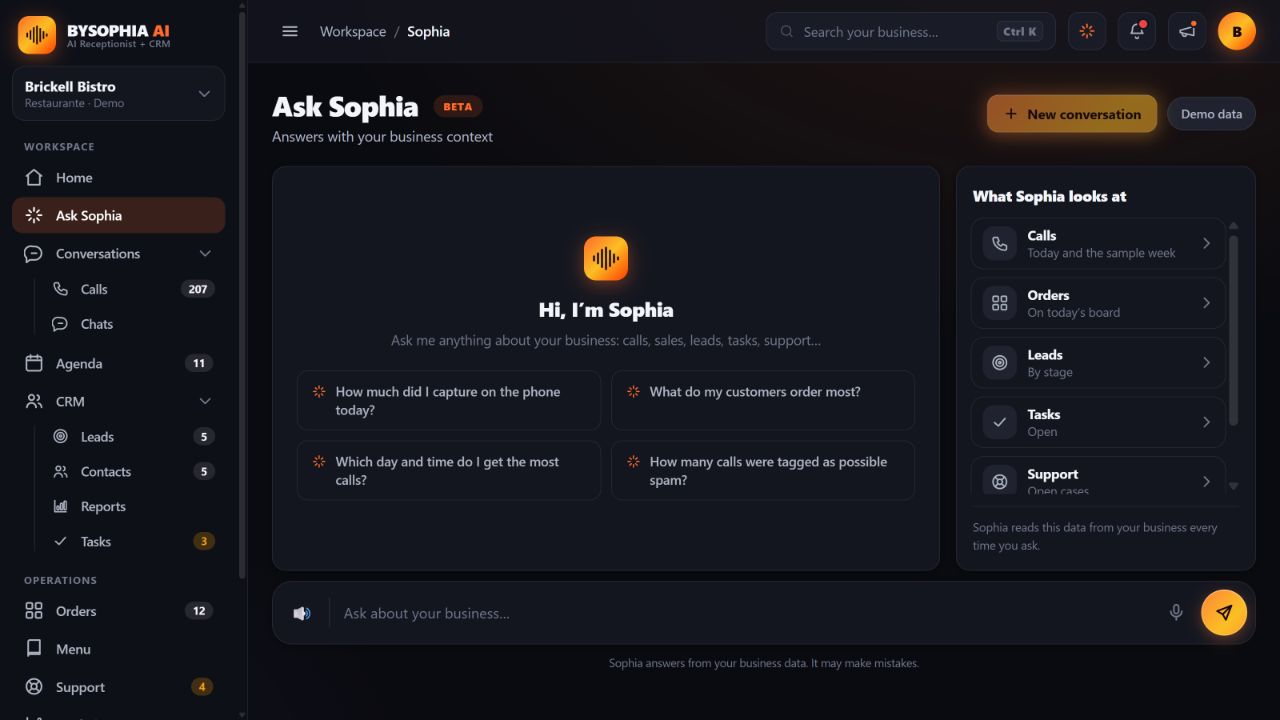
Ask about your calls, contacts, opportunities and pending work. Continue the conversation in English or Spanish with your business context.
 Enlarge screenshot
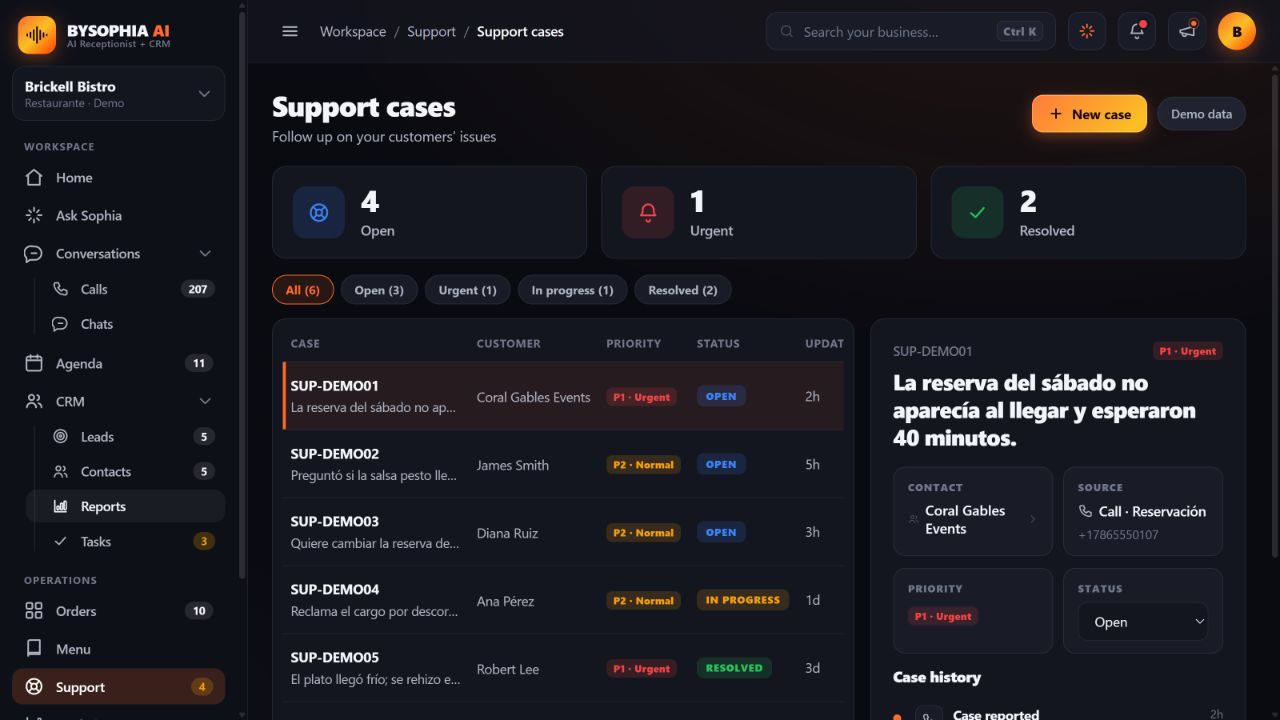
Track support cases by priority and status, with a case number and the customer’s request. Your team can follow each issue through resolution.
 Enlarge screenshot
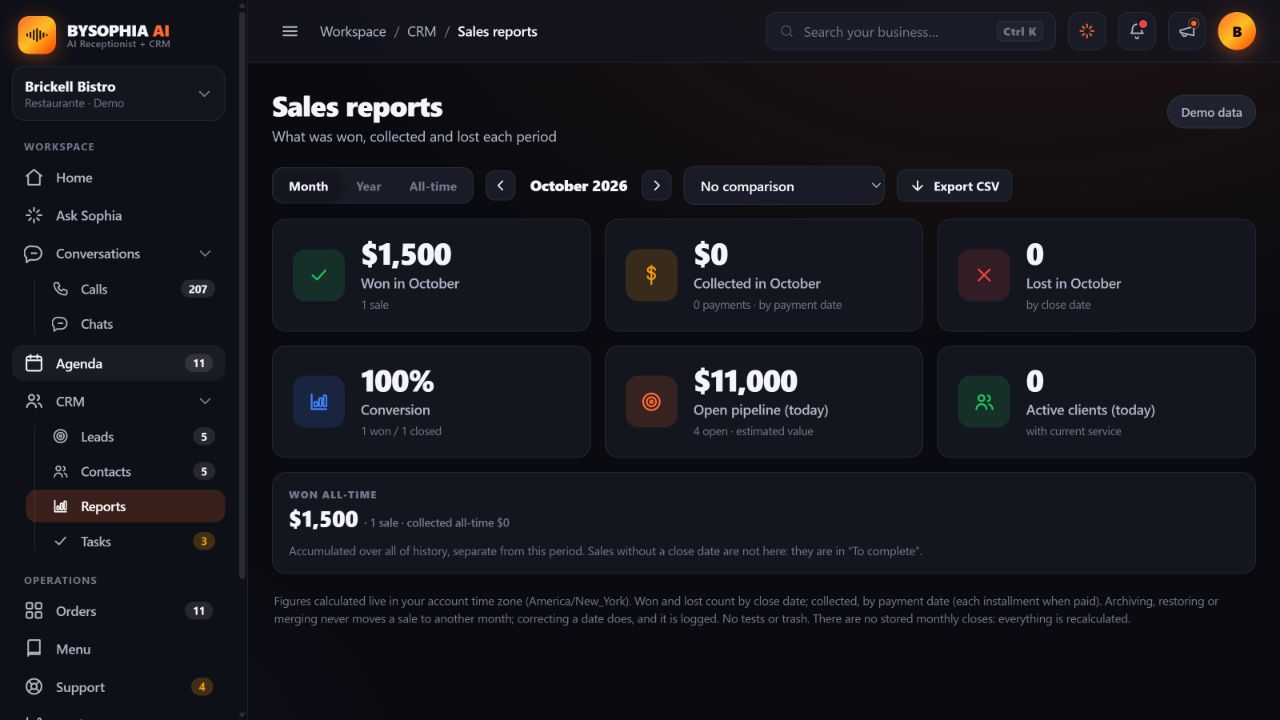
Explore calls and opportunities by period. Keep opportunity estimates, won sales and recorded payments separate, and export your reports.
Current app screenshots with demonstration data. Select a feature, then open its screenshot to explore.
Nobody hands you a cold call. If the caller asks for a person, she passes it over with everything already handled.
Name, phone, and in one line what the call is about. She qualifies it while she talks.
If it is an appointment, it is already on your calendar. If it is a problem, the case is already open with its tracking number.
She calls you and, before connecting you, tells you out loud who is on the line, what they need and whether she already booked the appointment or opened a support case. You pick up informed, not guessing. Outside your hours she takes the details so you can call back.
You never take a call blind: you already know the name, the reason and what she has done about it, so you can decide well from the first second.
Explore the current app: from a call to a contact, an appointment and the next step.
Swipe or use the arrows. Open any screenshot to see the details.
 Your business at a glance
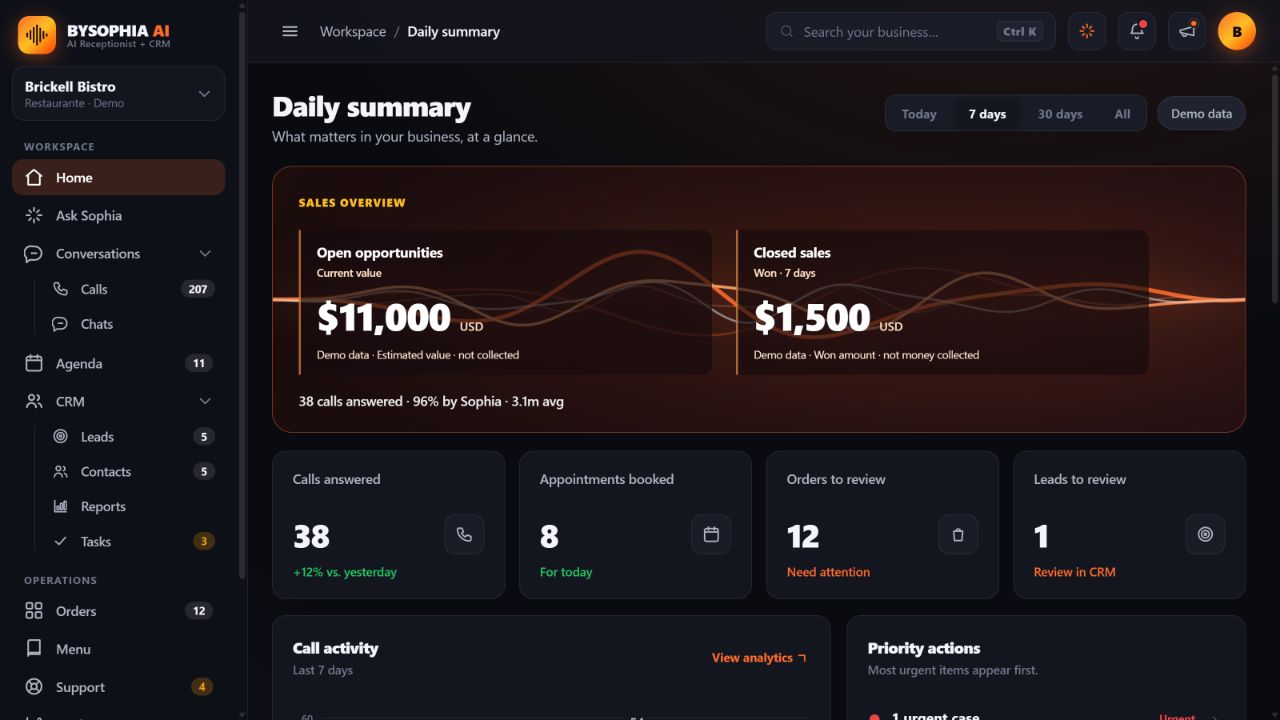
See estimated opportunity value and sales won by period, alongside calls, bookings and pending work on Home. Estimates and won sales are distinct from money collected.
Ask Sophia
Sophia answers with your business context in English or Spanish and keeps the conversation thread. You can ask follow-up questions. AI answers may contain errors.
A CRM for following up
Organize leads and contacts, move opportunities through stages and record values and follow-ups. Distinguish open pipeline, won sales and recorded payments.
Your schedule, organized
Review appointments by month, week or list. Open a day to see details, create or edit an appointment. New appointments are stored in bySophia; automatic booking on calls requires a connected calendar.
 A process for every call
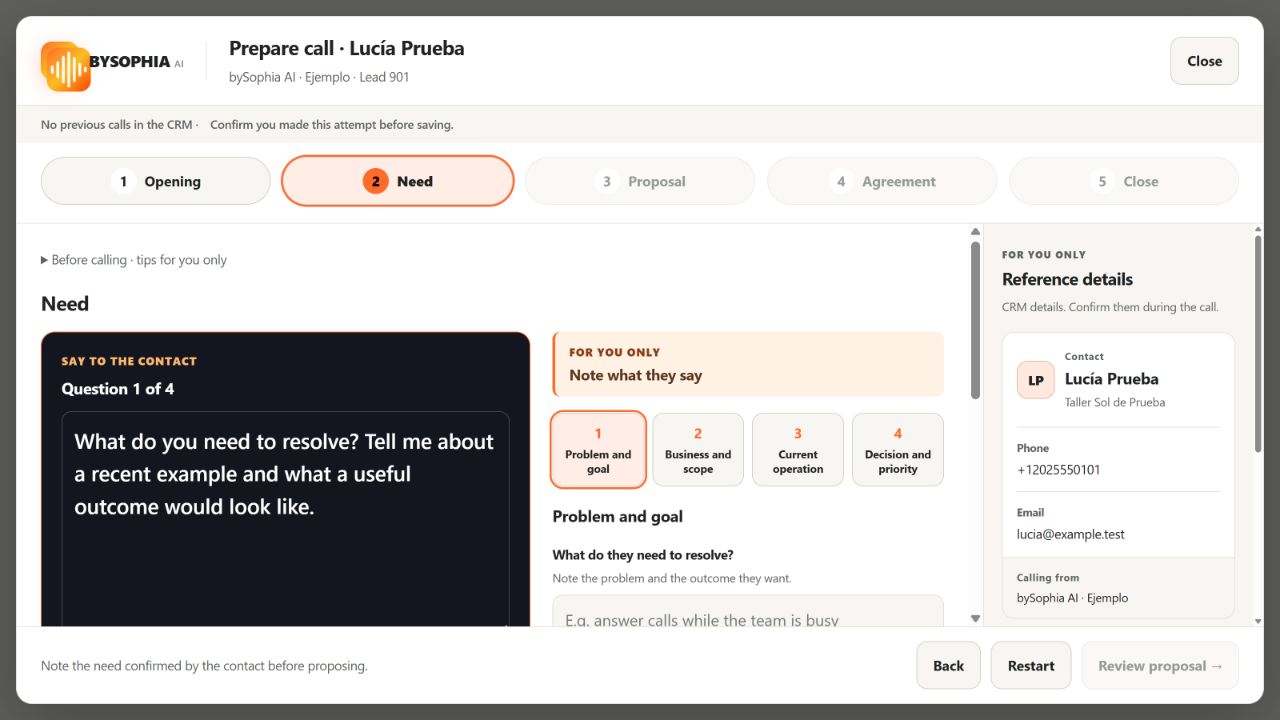
The manual guide separates what you say from instructions for you. Work through need, proposal, agreement and closing, including voicemail and messages to another person. Save the confirmed outcome and your notes to the timeline. Follow-ups remain drafts.
Your numbers, with context
Review won sales, recorded payments and losses by period, alongside conversion and estimated open opportunity value. Compare periods and export reports as CSV.
Issues that stay on your radar
Follow up on customer issues using a case reference, priority and status. Keep contact context and case history through resolution.
Every conversation, with context
Review what the caller needed, what Sophia did and the conversation outcome. Filter by date, language or outcome and open each call’s summary and transcript.
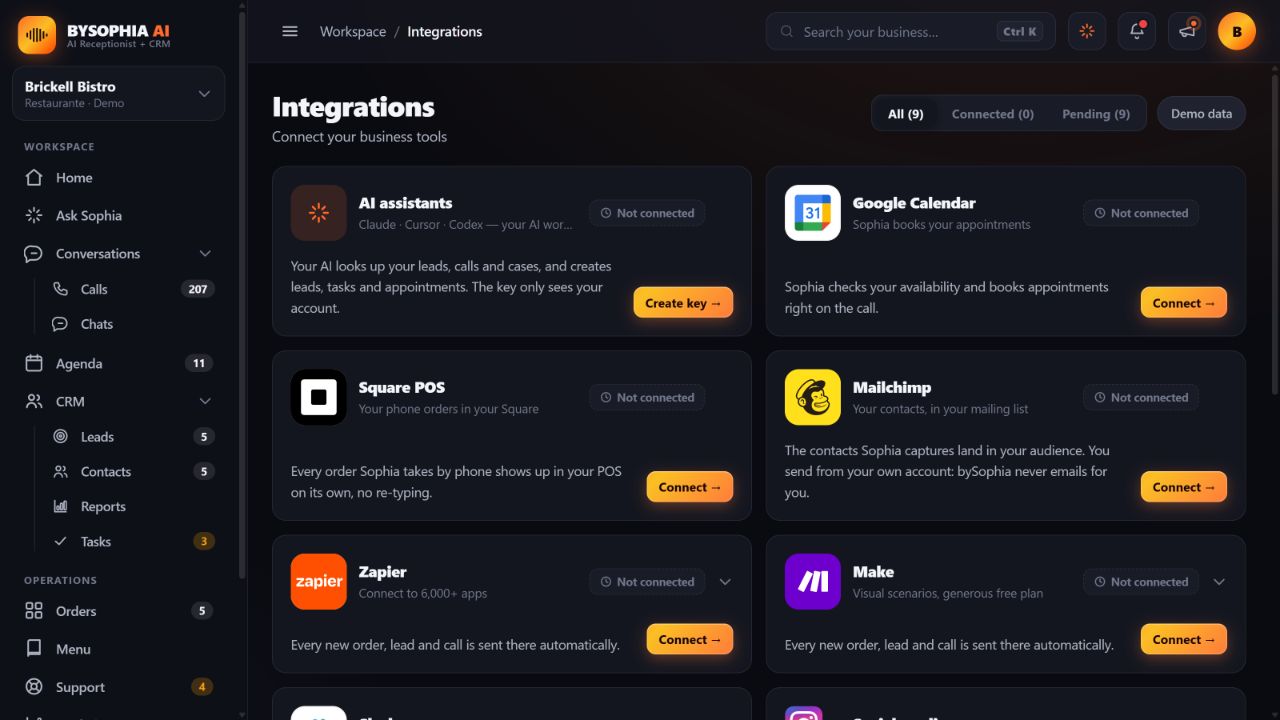 Connect your tools
Connect your accounts and configure available business integrations, including Claude, Cursor or Codex. Third-party accounts and setup are required; social channels have their own availability. All connections in this screenshot are unconfigured.
Everything Sophia captures lands somewhere useful. This is what you get with her, at no extra cost.
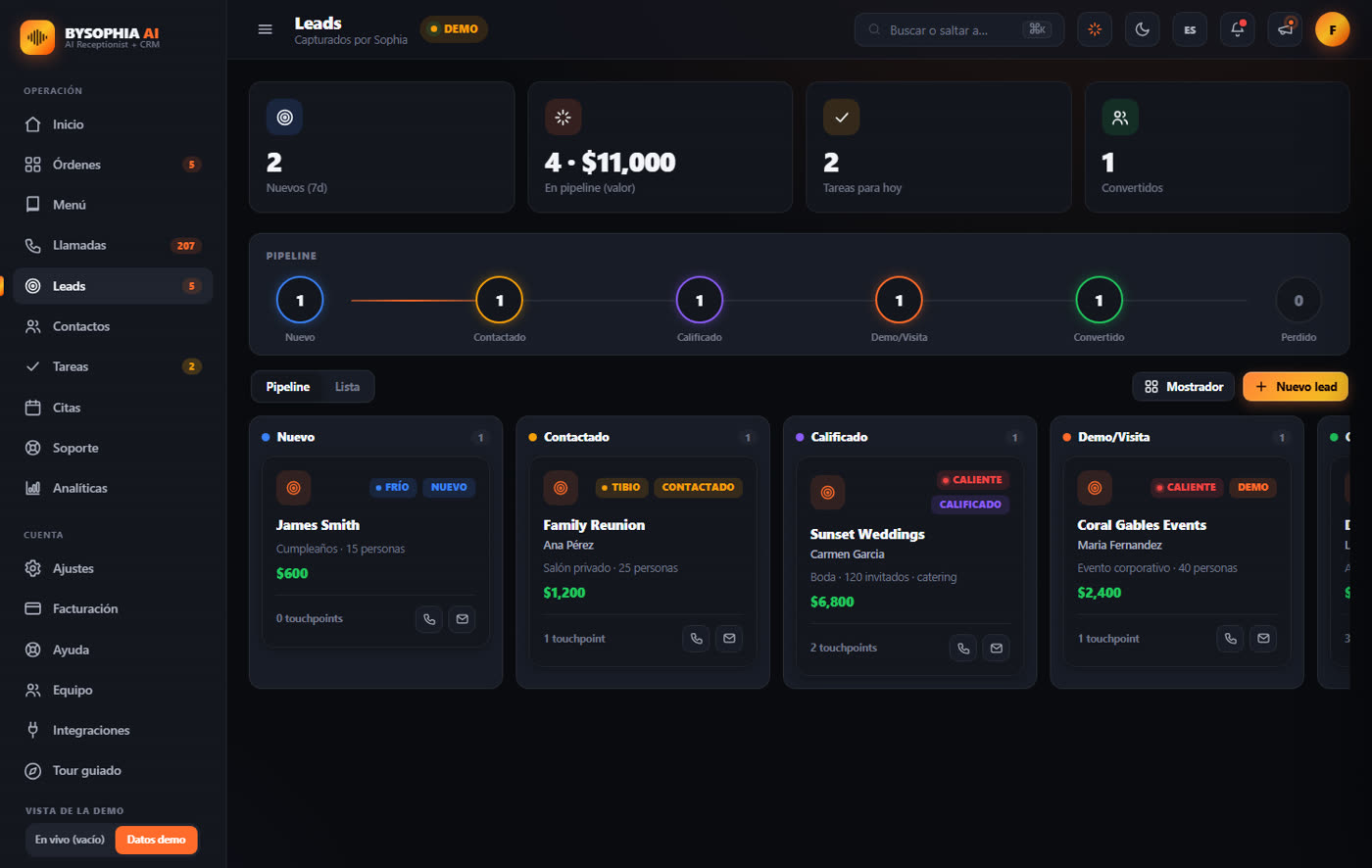
Every call becomes a lead in a visual pipeline: new, contacted, qualified, booked, won. Sophia tags each one Hot, Warm or Cold based on how the call went, you put a dollar value on it, and you see how much money is in play. Robocalls that hang up in seconds get flagged as spam and stay out of your numbers.
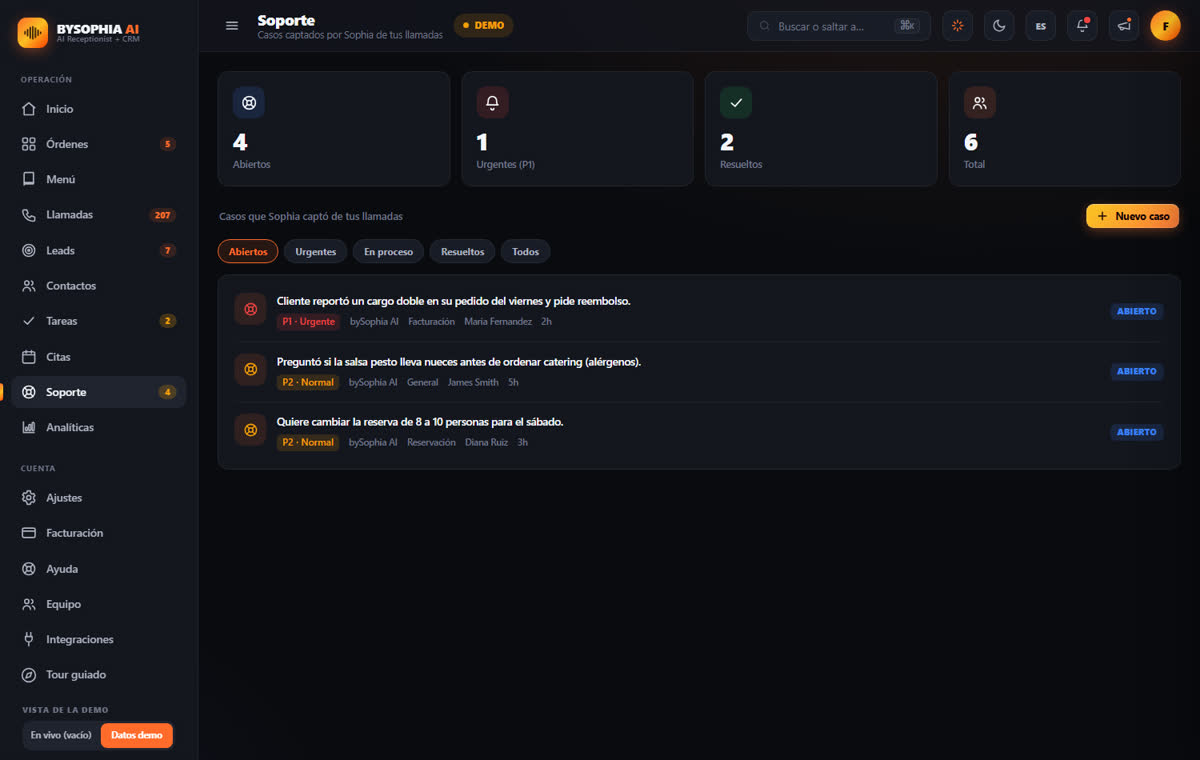
When someone calls with a problem, a refund, a complaint, a cancellation, Sophia logs it as a case with its own tracking number. Urgent ones show up in red on your home screen and in the bell. You can also open a ticket yourself and follow it until it is resolved.
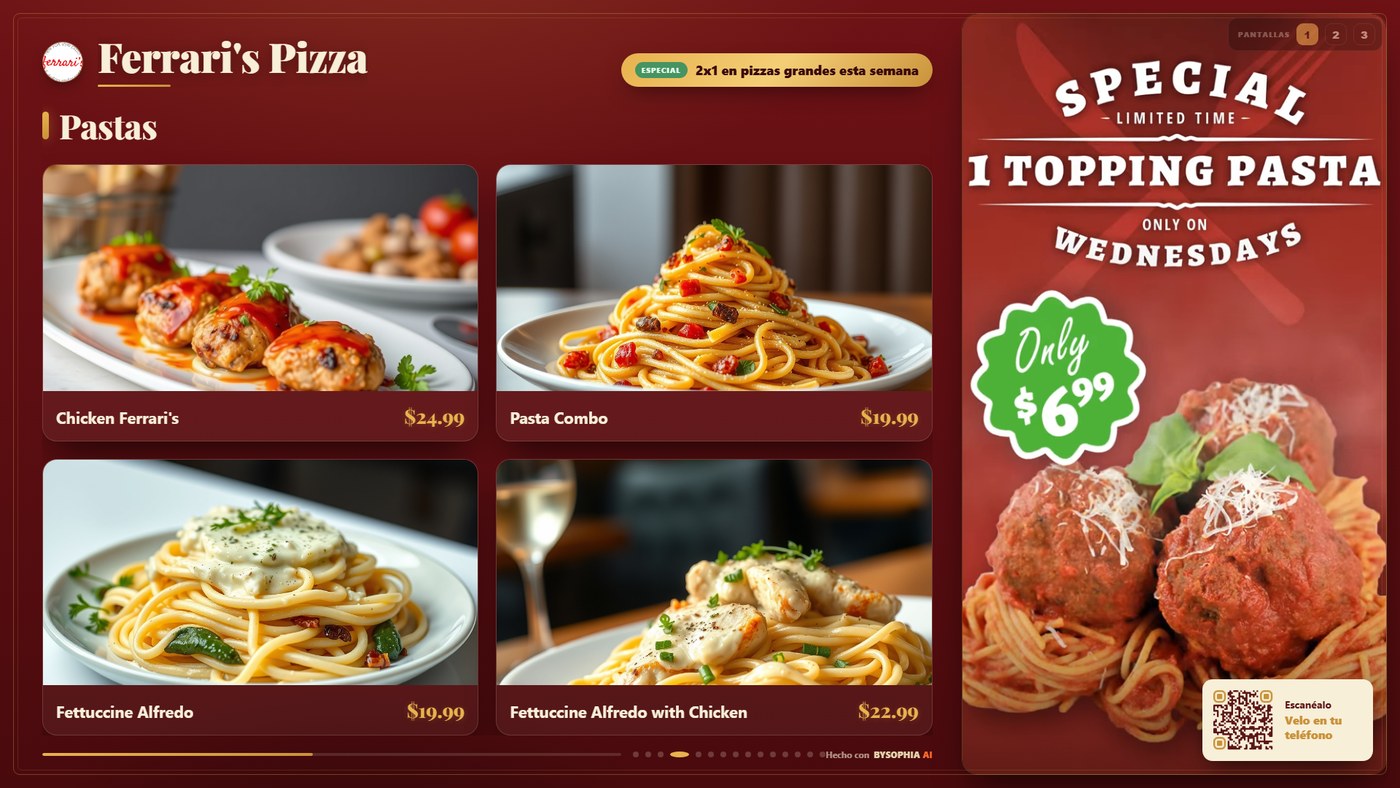
To take orders over the phone, Sophia already keeps your menu up to date. That same menu can go on a screen in your store, at no extra cost.
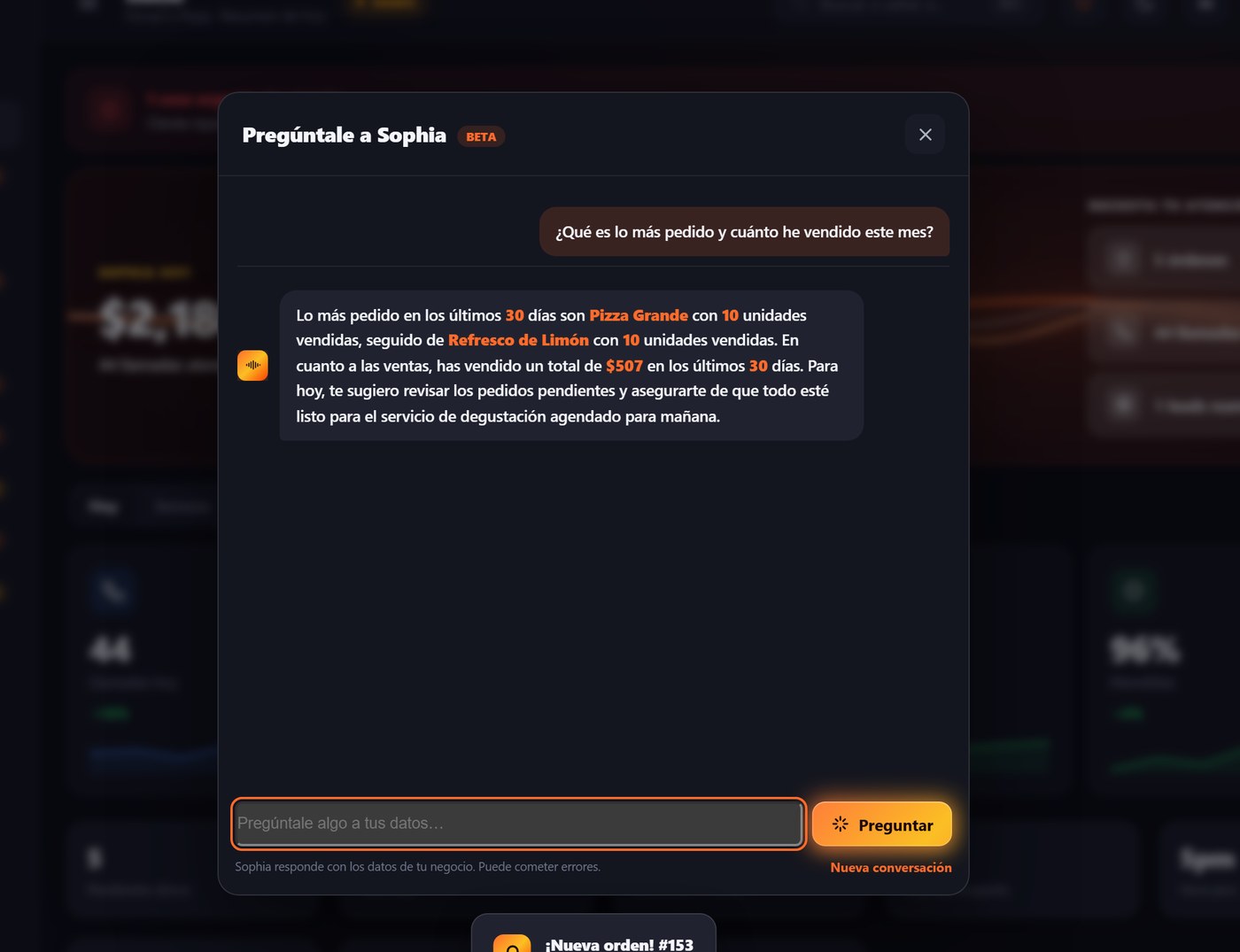
What sells the most, how much you billed this month, which leads you have not followed up, which tasks are overdue. Sophia answers with the exact numbers from your business, in English or Spanish, and you can keep the conversation going.
Sophia doesn't ask you to change your tools. She plugs into them, from your dashboard, without code.
Every order Sophia takes lands straight in your point of sale, ready to prepare and charge.
She checks your real availability during the call and books the appointment on your calendar.
Every order, lead and call can flow into your spreadsheets, email and thousands of other apps.
Add a "See our menu" button to your digital card so customers go straight to your menu.
All of them are switched on from Integrations inside your dashboard.

We map your services, customers, FAQs, and the way you like to communicate.

Our team sets up bySophia AI and connects her to your phone number and calendar.

bySophia AI starts answering immediately. You get reports. Your business never misses another opportunity.
Choose your type of business and see how bySophia can answer calls, capture inquiries and book appointments.
Swipe or use the arrows. Open a card to see the full details.

Takes phone orders, books tables and answers menu questions.
She takes orders and reservations over the phone, answers what is in each dish and what time you open, and sends the order straight to your point of sale. Your menu can also live on the screen in your store.

Gathers project details and schedules a site visit.
bySophia AI gathers project details, qualifies budget, and schedules a visit automatically.

Answers property inquiries and schedules showings.
Handles inquiries 24/7, pre-qualifies buyers or tenants, and schedules showings without you being available.

Captures service requests, even after hours.
HVAC, plumbing, electrical and handyman businesses get every after-hours emergency call answered, qualified and dispatched, so urgent jobs never slip to the next contractor.

Answers tenant inquiries and routes maintenance requests.
Handles tenant inquiries, schedules showings, routes maintenance requests, and pre-qualifies new applicants 24/7, without your team being tied to the phone.

Books appointments and answers questions about your services.
Handles all reservations, answers service questions, and confirms appointments automatically, recurring bookings without manual back-and-forth.

Gathers project needs and captures quote requests.
Manages project inquiries, quote requests, and bookings, just like EA Creative Agency does.

Schedules service appointments and captures vehicle inquiries.
She answers while you are under a car: quotes, service appointments and the "is it ready yet?" call. Every one is logged with the name, the phone and what the car needs.
From answering the first call to keeping your team informed: see what you can manage in one platform.
| What you need | Voicemail | Answering service | bySophia AI |
|---|---|---|---|
| Answer and assist your customers | |||
| 24/7 phone answering | Depends on provider or configurationRecords a message when routed to voicemail | Depends on provider or configurationCoverage may include 24/7 | Available, according to planAI answering, day and night |
| English and Spanish | Depends on provider or configurationRecorded greeting, as configured | Depends on provider or configurationLanguages offered by the provider | Available, according to planBilingual conversations |
| Lead qualification | Not a built-in function; requires another toolYou review messages and call back | Depends on provider or configurationIntake according to service instructions | Available, according to planCaptures the reason for calling and qualifies leads |
| Appointment booking | Not a built-in function; requires another toolManual or another tool | Depends on provider or configurationAvailable with supported calendars | Available, according to planBooks with your connected Google Calendar |
| Call transfers | Depends on provider or configurationPhone-system routing, if available | Depends on provider or configurationTransfers according to the service | Available, according to planBriefs your team before connecting the caller |
| Transcripts and summaries | Depends on provider or configurationVoicemail recording; transcription varies | Depends on provider or configurationCall records depend on the plan | Available, according to planCall history, transcripts and summaries |
| Website chat | Not a built-in function; requires another toolRequires another tool | Depends on provider or configurationSome providers also offer chat | Available, according to planAI attention for your website visitors |
| Manage your business and team | |||
| CRM and customer organization | Not a built-in function; requires another toolRequires another tool | Depends on provider or configurationCRM capabilities or connections vary | Available, according to planContacts, opportunities, tasks and CSV import/export |
| Customer support cases | Not a built-in function; requires another toolManual or another tool | Depends on provider or configurationTracking depends on the service or CRM | Available, according to planTracking number, priority and status |
| Ask Sophia | Not a built-in function; requires another toolNot a voicemail function | Depends on provider or configurationDepends on the connected platform | Available, according to planAsk about your calls, sales and pending work |
| Guide for your team’s calls | Not a built-in function; requires another toolYou prepare your own script | Depends on provider or configurationOperator tools depend on the service | Available, according to planStep-by-step script, voicemail and third-party answers |
| Save call notes and outcomes | Not a built-in function; requires another toolManual or another tool | Depends on provider or configurationDepends on the service or CRM | Available, according to planConfirmed attempts, answers and notes in contact history |
| Agreements and follow-up | Not a built-in function; requires another toolYou manage follow-up yourself | Depends on provider or configurationDepends on the agreed workflow | Available, according to planOwners, agreements and editable follow-up drafts |
| Business reports and amounts | Not a built-in function; requires another toolRequires another tool | Depends on provider or configurationDepends on the reporting tools or CRM | Available, according to planOpen opportunity estimates, won sales and recorded payments |
| Team members and roles | Depends on provider or configurationPhone-system access, as configured | Depends on provider or configurationTeam access depends on the provider | Available, according to planAdministrators and members according to your plan |
| Mobile and desktop app | Depends on provider or configurationDepends on your phone service | Depends on provider or configurationDashboard or app depends on the provider | Available, according to planYour dashboard with notifications on supported devices |
| Connect your tools | |||
| Business integrations | Not a built-in function; requires another toolRequires other tools | Depends on provider or configurationProvider’s integration catalog | Available, according to planGoogle Calendar, Square POS, Mailchimp, Zapier, Make and Slack |
| External AI assistants | Not a built-in function; requires another toolRequires another platform | Depends on provider or configurationDepends on platform compatibility | Available, according to planConnect Claude, Cursor or Codex to your account |
| Tools for restaurants | Not a built-in function; requires another toolRequires other tools | Depends on provider or configurationDepends on the service and integrations | Available, according to planOrders with connected Square, digital menus, screens and QR |
| Choose your plan and support | |||
| Price and included minutes | Depends on provider or configurationDepends on your phone service | Depends on provider or configurationProvider’s rates and usage allowances | Depends on provider or configurationFrom $99/month, or $89/month billed $1,068 annually. Essential: 300 minutes each month. |
| Setup and personalization | Depends on provider or configurationRecorded greeting, as configured | Depends on provider or configurationAccording to the service and contract | Available, according to planStandard setup through personalized voice, scripts and monthly review, by plan |
| Support from your provider | Depends on provider or configurationAccording to your phone service | Depends on provider or configurationAccording to the support agreement | Available, according to plan24/7 chat support from bySophia for your account; Pro gets priority |
A general comparison of service types. Answering-service features, coverage and prices depend on the provider and contract.
Your plan defines included call minutes, team members, voice lines, personalization and setup assistance. Business modules are configured for your business type; integrations require connected accounts. Device notifications require support and permission.
Instagram and Facebook are subject to availability. WhatsApp and TikTok are coming soon. Other messaging apps require a configured Zapier or Make bridge.
Compare plans and included minutes →Pick your industry, adjust the numbers. See exactly what you're losing, and how fast bySophia pays for itself.
bySophia Pro pays for itself in 0 days, then keeps printing money 24/7.
Cancel anytime, no penalty. No commitments. Setup fee is non-refundable.
Estimate a scenario before choosing your plan →With annual billing: Essential $89/month; save 20% on Starter, Plus and Pro. Prices are in USD; applicable taxes are additional.
Every plan includes phone answering, website chat and the shared business tools below. Choose your call capacity and level of setup assistance.
For getting started: answer calls, book appointments and organize your customers.
For a small business that wants setup assistance and room to work with an assistant.
For organizing your customer process: inquiries, appointments and follow-up, with setup assistance.
For higher call volumes and several lines, with advanced personalization and monthly performance review.
For multiple locations or special requirements. Minutes, team members, lines, setup and support are defined in your quote.
Contact UsOne platform to serve your customers and manage your business.
Ask about your calls, sales and pending work in your own words.
24/7 chat support for your account
Included minutes renew each billing month, including on annual plans.
Alerts at 80% and 100% of usage. Default per-call cap: 8 minutes.
Enterprise limits and pricing are agreed in your quote.
The $200 one-time setup for Starter, Plus and Pro covers business information, call configuration, connected accounts and getting started with the dashboard. Third-party accounts and subscriptions are separate.
Team allowances include the account owner. Members share the plan’s call minutes; adding people does not add minutes. Dashboard members, phone lines and transfer destinations are different things.
Modules are configured for your type of business. Integrations require connecting your accounts. Restaurants also have order management and digital menus.
Instagram and Facebook: subject to availability. WhatsApp and TikTok: coming soon. Other messaging apps can connect through a Zapier or Make bridge.
We'll contact you within 24 hours to schedule your personalized bySophia AI demo.
Call us now and our team will set up bySophia AI for your business. No technical knowledge required, we handle everything.